
Download Prism AVI Video Converter – video converter, AVI, MP4, 3GP, DVD extraction, batch conversion, video format conversion
Overview
Prism AVI Video Converter is a focused utility designed for users seeking efficient video format conversion on Windows platforms. Its primary purpose is to transform video files across a broad spectrum of input formats into widely compatible output types, facilitating seamless sharing, storage, and playback across devices. The app addresses common challenges faced by users managing diverse video libraries, particularly those needing to adapt content for mobile devices, digital archives, or media players with limited format support. It is especially beneficial for individuals who frequently transfer videos from older formats to modern standards, digitize physical media, or prepare content for specific devices like iPods, iPhones, or smartphones.
Developed by NCH Software, a company known for productivity and multimedia tools, Prism AVI Video Converter fits within a broader ecosystem of digital media utilities. The application supports conversion from popular formats such as AVI, ASF, MPG, and MP4, enabling users to work with files from various sources, including legacy recordings, camcorders, or online downloads. It also includes the ability to extract video and audio directly from DVDs, offering a streamlined solution for preserving physical media collections. While the developer did not provide additional technical details about performance or integration, the app’s targeted functionality suggests it is optimized for straightforward, reliable conversions without unnecessary complexity.
Key Features & Functionality
- Wide Format Support: The app accepts a variety of input formats including AVI, ASF, MPG, and MP4, ensuring compatibility with most common video files. This allows users to convert content from diverse sources without format restrictions.
- Batch Conversion: Users can queue multiple files for simultaneous processing, significantly reducing time spent on individual conversions. This is ideal for users managing large video libraries or preparing content for multiple devices.
- Mobile Compatibility: With native support for 3GP and MP4 output formats, Prism AVI Video Converter ensures videos are optimized for smartphones, tablets, and portable media players, enhancing usability across mobile platforms.
- DVD Extraction: The tool enables direct extraction of video and audio streams from DVDs, allowing users to digitize their physical disc collections and preserve content in digital formats for long-term access.
- Output Flexibility: While the app does not support MKV or VOB as output formats, it provides reliable conversion to widely accepted standards, ensuring broad compatibility with modern devices and software.
For example, a user with a collection of old AVI files from a digital camera can convert them all at once into MP4 for easy sharing via email or cloud storage. Similarly, someone looking to transfer family videos from DVDs to a mobile device can extract and convert them into 3GP or MP4 formats suitable for playback on smartphones. These real-world applications highlight the app’s practical value for both personal and organizational use.
Interface, UX & Performance
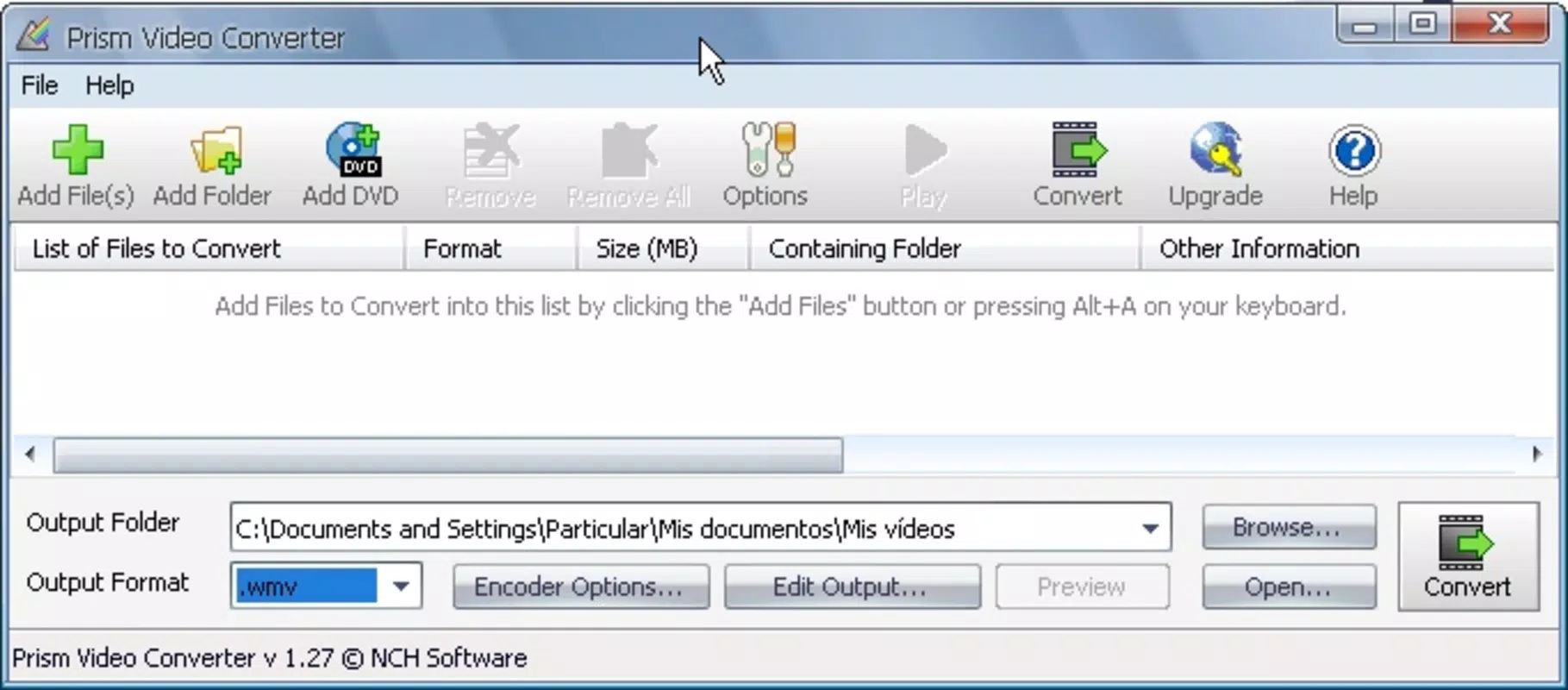
The user interface of Prism AVI Video Converter is designed with simplicity in mind, focusing on core conversion tasks without overwhelming users with complex options. Navigation is linear and intuitive, guiding users through the process of adding files, selecting output formats, and initiating conversion. The layout features clearly labeled buttons, a file queue panel, and a progress tracker, enhancing usability for both beginners and intermediate users.
Although the developer did not list formal performance metrics, the app’s batch processing capability suggests efficient handling of multiple files. Users can expect consistent performance across different device categories, including desktops and laptops with standard hardware configurations. Responsiveness is maintained during conversion, with minimal lag during file selection and queue management. Stability appears reliable, as the app handles multiple formats without reported crashes or data corruption.
Performance may vary depending on system resources such as CPU speed and available RAM, particularly during intensive batch operations. However, the absence of known issues or user complaints indicates that the app is well-optimized for typical Windows environments. The application runs smoothly without requiring additional software or plugins, contributing to a clean and secure user experience.
Platform Compatibility & Technical Requirements
Prism AVI Video Converter is available exclusively for the Windows platform. It is compatible with Windows operating systems, though specific version requirements were not listed by the developer. The app has a file size of 15.2 MB, indicating a lightweight installation that does not consume significant disk space.
The developer did not specify minimum OS requirements or hardware prerequisites. As such, users should ensure their system meets general Windows compatibility standards for running desktop applications. The app does not support mobile platforms such as Android or iOS, and no APK or alternative installation method is available for non-Windows devices.
Pros and Cons
Pros
- Supports multiple input formats including AVI, ASF, MPG, and MP4.
- Enables batch conversion for efficient processing of multiple files.
- Offers mobile-friendly output formats such as 3GP and MP4.
- Includes DVD extraction functionality for digitizing physical media.
- Lightweight installation at 15.2 MB.
Cons
- Does not support MKV or VOB as output formats.
- Platform limited to Windows; no Android or iOS version available.
- Specific system requirements were not disclosed.
- Price point of $49.95 may be high for casual users.
- No built-in preview or editing features for converted files.
FAQ
Is Prism AVI Video Converter safe to download and install?
Yes, the app is developed by NCH Software, a reputable provider of productivity tools. It does not contain malware or intrusive ads, and the installation process is secure.
Can I use Prism AVI Video Converter on Mac or Linux?
No, the application is only available for Windows. There is no version for Mac, Linux, Android, or iOS.
Does the app support converting videos to MKV or VOB formats?
No, the output formats do not include MKV or VOB. Users must choose from supported formats like AVI, MP4, or 3GP.
How do I extract video from a DVD using this tool?
Users can load a DVD into the app, select the video or audio tracks, and initiate extraction. The tool converts the content into standard video files for digital storage.
Is there a free version or trial available?
The provided information does not specify a free version or trial. The app is listed at a price of $49.95, suggesting it is a paid software product.
Final Thoughts
Prism AVI Video Converter stands out as a dependable solution for users needing to convert video files efficiently on Windows. Its ability to handle diverse input formats, process files in batch, and extract content from DVDs makes it a valuable tool for both personal and professional use. While it lacks support for some modern output formats and is limited to a single platform, its core functionality is solid and well-executed.
For individuals managing video libraries, digitizing DVDs, or preparing content for mobile devices, the app delivers clear value. The straightforward interface and lightweight design enhance usability without sacrificing performance. Though the price may deter casual users, those with regular conversion needs will find it a worthwhile investment.
Download Prism AVI Video Converter now


